Vengeance
Vengeance for ARC Raiders with Memory Aimbot, player ESP, loot filters and radar. Explore features, screenshots and 1, 3, 7 or 30-day keys on Playmate Market.
This term is delivered manually: the key will arrive in the FunPay order chat within 2 h after payment.
- Your key arrives right after payment
- Payment via FunPay — your money is protected by the marketplace
- Launch instructions come with the key
- Your key is issued right after payment
- Online payment with a convenient method
- Launch instructions come with the key
Functions Vengeance
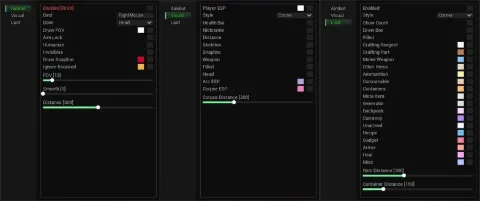
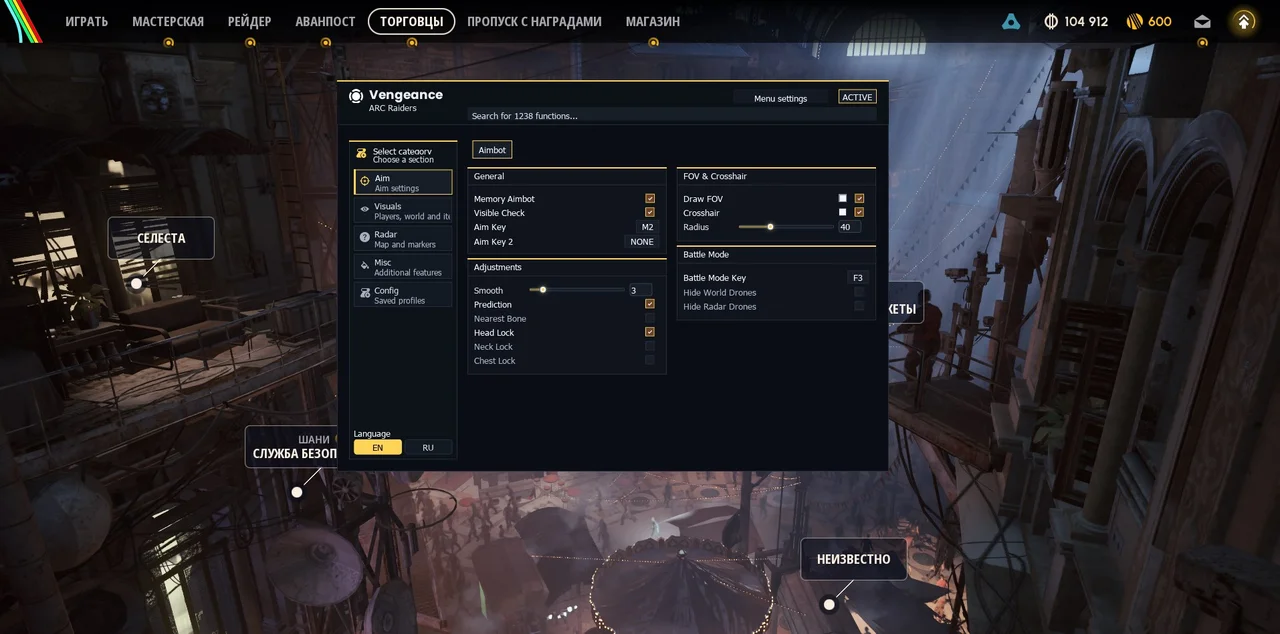
Aim12
- Memory Aimbot - Aims at the selected target inside the FOV while the assigned key is held.
- Visible Check - Separate visibility check for aim target selection.
- Aim Key / Aim Key 2 - Two configurable activation keys.
- Smooth - Adjustable aim smoothing from 1 to 15.
- Prediction - Movement prediction using available projectile-speed data.
- Nearest Bone - Selects the available body point closest to the crosshair.
- Head Lock - Locks aim to the head.
- Neck Lock - Locks aim to the neck.
- Chest Lock - Locks aim to the chest.
- Draw FOV - Displays the aim circle with a configurable color.
- Radius - FOV radius adjustment from 1 to 120.
- Crosshair - Static center-screen crosshair with a configurable color.
Battle Mode3
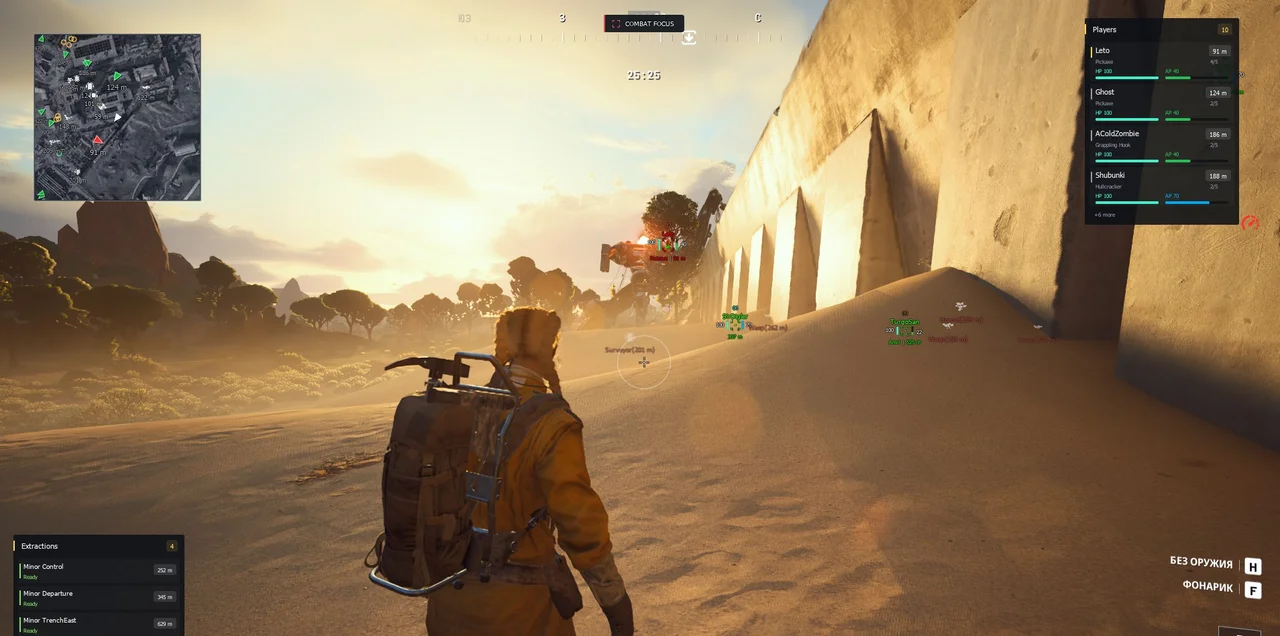
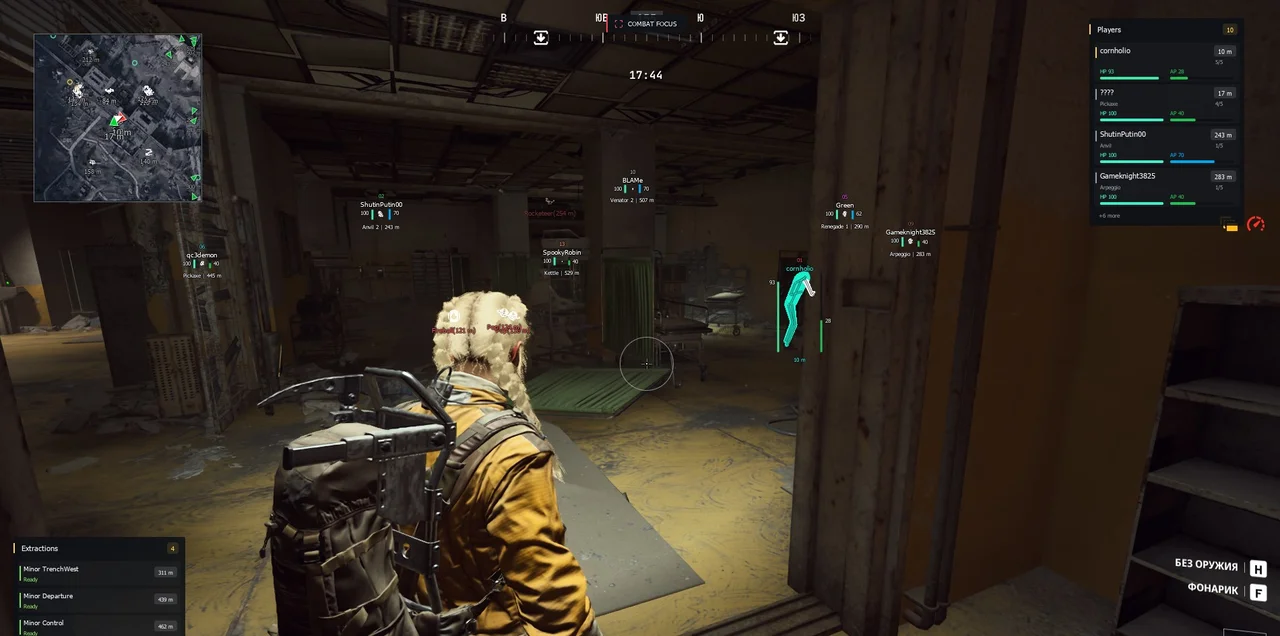
- Battle Mode Key - Toggles combat focus, hiding world item, container and extraction markers and their radar layers. Displays COMBAT FOCUS at the top.
- Hide World Drones - Also hides world drones during Battle Mode.
- Hide Radar Drones - Also hides radar drones during Battle Mode.
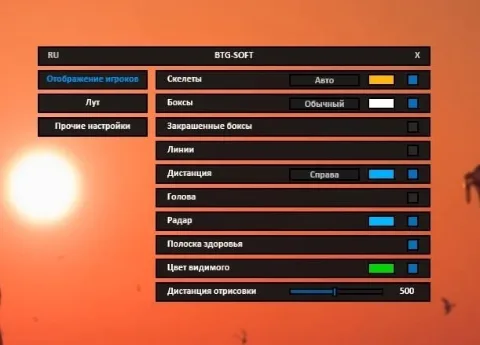
Visuals / Players22
- Enable Box - Displays a player box.
- Box Style - 2D Bounding, 3D Corner, None or 2D Corner.
- Box Fill - Translucent fill for supported 2D boxes.
- Visibility - Checks body-part visibility against scene geometry for ESP and fill colors; does not mean visible players only.
- Body Mesh - Solid screen-space silhouette following the player pose, without a grid or stripes. Uses visibility colors when enabled and a neutral color for unknown states.
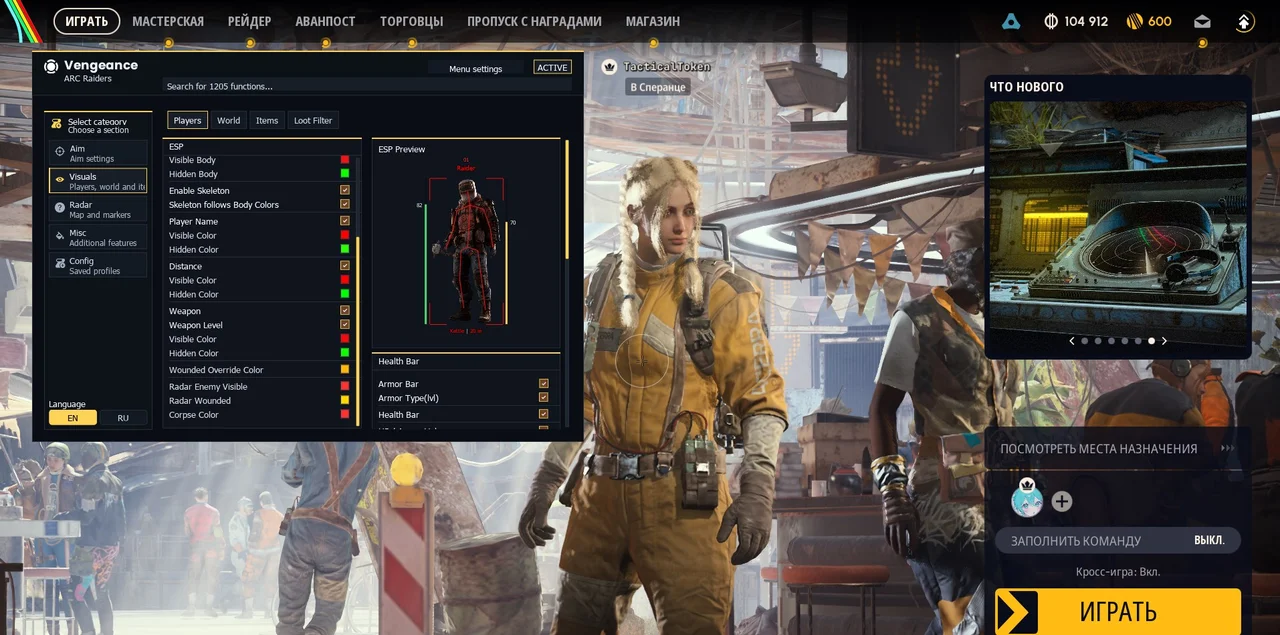
- Visible Body / Hidden Body - Separate colors for visible and hidden body areas.
- Enable Skeleton - Displays the player skeleton.
- Skeleton follows Body Colors - Uses body colors or independent visible/hidden skeleton colors.
- Player Name - Player name with separate visible and hidden colors.
- Distance - Distance in meters with separate visible and hidden colors.
- Weapon - Weapon name with separate visible and hidden colors.
- Weapon Level - Adds weapon level when data is available.
- Health Bar - Thin health bar on the left.
- Armor Bar - Thin armor bar on the right.
- Armor Type(lvl) - Armor-bar color based on available armor type/level data.
- HP / Armor Values - Numeric health and armor beside their bars.
- Damage Numbers - Floating damage numbers based on HP and shield changes; consecutive hits are combined.
- Players Distance - Player ESP range up to 1000 m; 0 removes the player-distance limit.
- Corpses / Corpses Distance - Player remains with a separate color and range up to 1000 m.
- TeamId - Compact squad code 01–25 with a shared squad color; ALLY for teammates and -- for unknown squads.
- ESP Preview - Menu preview of boxes, skeleton, name, squad, weapon, distance and health/armor bars.
- Wounded Override Color - Separate color for wounded/downed players.
HUD8
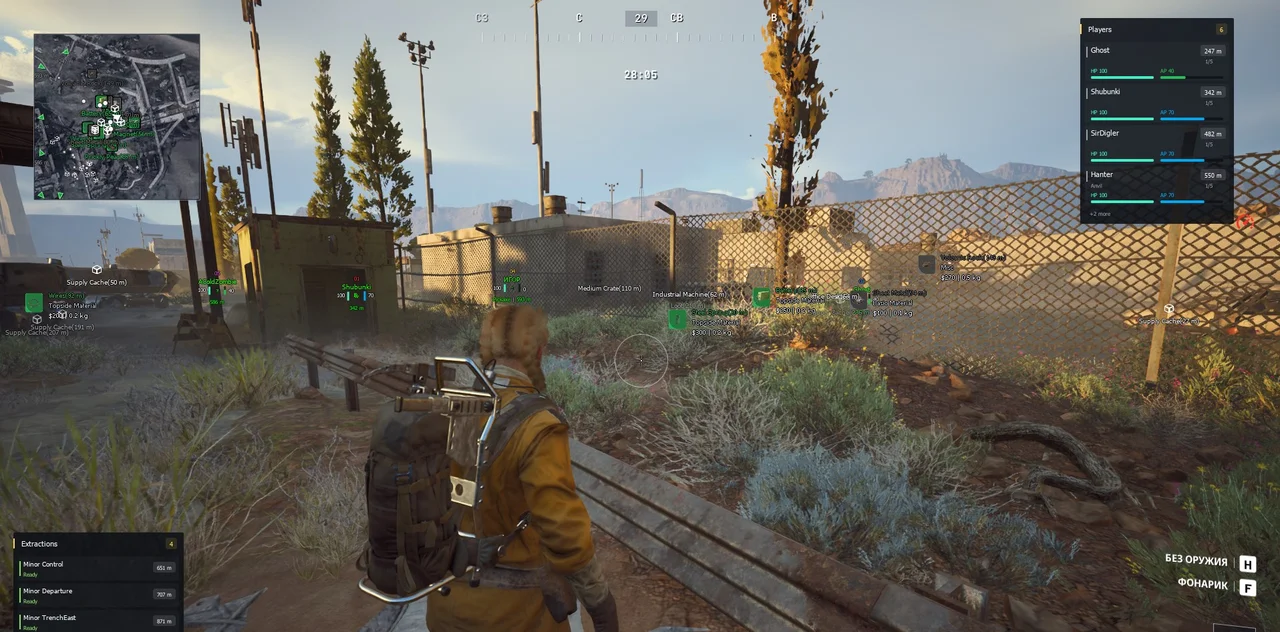
- Player HotBar - Up to four nearest players with name, distance, weapon, health and armor; counter of all players within the configured range.
- Threat Score - Interface estimate from 0 to 5 based on distance, visibility and health; not an in-game rank.
- Extraction HUD - Up to six exits with name, status and distance; timer when data is available.
- Loot HUD - Up to five items with name, distance, value and rarity color. Respects item filters and requires Enable Items.
- Sort by distance - Sorts Loot HUD by distance; otherwise sorts by descending value.
- HotBar X / Y; Extraction X / Y; Loot HUD X / Y - Independent panel positions.
- Reset HotBar pos / Reset Extraction pos / Reset Loot pos - Resets each panel position.
- HUD Drag - Drag panels by an empty area while the menu is open.
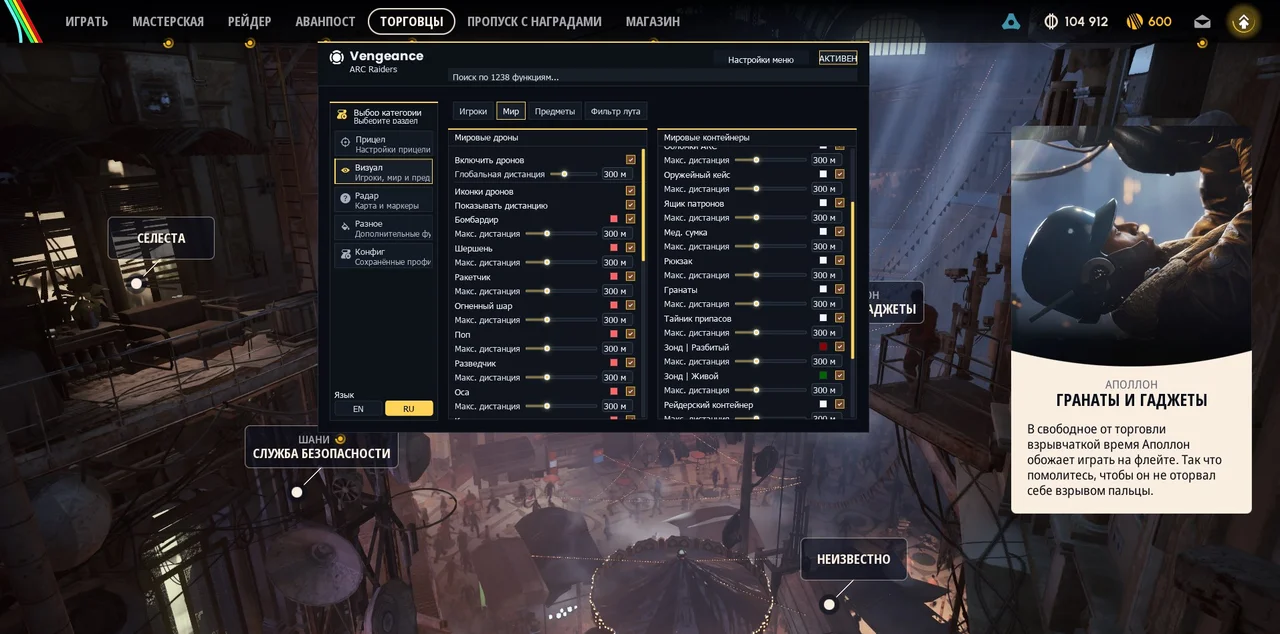
Visuals / World - ARC drones5
- Enable Drones - Displays ARC drones/machines in the world.
- Global Max Distance / Per-type Max Distance - Global and individual ranges up to 1000 m, with toggles and colors per type.
- Show Drone Icons - Compact ARC icons with preserved aspect ratios.
- Show Distance Text - Distance beside each name.
- ARC Types - Bombardier, Hornet, Rocketeer, Fireball, Pop, Surveyor, Wasp, Tick, Turret, Bastion, Leaper, Spotter, Snitch, Shredder, The Queen, Sentinel, Turbine, Matriarch, Skulker and Bully.
Visuals / World - Containers and extractions16
- Enable Containers - World containers and objects with individual toggles, colors and ranges.
- Global Max Distance / Per-type Max Distance - Global and per-type container ranges up to 1000 m.
- Show Distance Text - Distance beside container names.
- Supply Cache - Supply containers with a cargo-crate icon.
- ARC Wreck - Destroyed ARC remains with a dedicated icon.
- Weapon Case - Weapon containers.
- Ammo Box - Ammunition boxes.
- Medical Bag - Medical bags.
- Backpack - Backpacks.
- Grenades - Grenade containers.
- Probe / Crashed; Probe / Alive - Separate toggles and ranges for crashed and intact probes.
- Raider Container - Raider containers.
- Cart Crate - Crates on carts.
- Security Camera - Surveillance cameras.
- Quest Container - Quest containers.
- Enable Extractions / Extraction Distance - World exits with a separate color and range up to 1000 m.
Visuals / Items14
- Enable Items - Enables world item ESP.
- Max Distance - Item range up to 1000 m.
- Minimum Value - Standard minimum-value filter from $0 to $30000.
- Show Icons - Item icons on rarity backgrounds.
- Show Type - Item category from the catalog.
- Show Value / Show Weight - Value and weight, combined into a compact line when both are enabled.
- Show Distance - Distance beside item names.
- Rarity Colours - Common gray, Uncommon green, Rare blue, Epic purple-pink and Legendary gold.
- Items: Rarity - Independent Common, Uncommon, Rare, Epic and Legendary toggles.
- Items: Type / Materials - Basic Material, Refined Material, Topside Material and Recyclable filters.
- Items: Type / Equipment - Quick Use, Shield, Augment, Modification and Blueprint filters.
- Items: Type / Weapons - Hand Cannon, Battle Rifle, Assault Rifle, Sniper Rifle, SMG, Shotgun, Pistol, LMG and Special Weapon filters.
- Items: Type / Other - Ammunition, Key, Trinket, Nature and Misc filters.
- Item Text - Fixed 12 px outlined text with opaque name, category and value/weight.
Visuals / Loot Filter7
- Enable Loot Filter - Dedicated price and item whitelist filter replacing standard Minimum Value, Rarity and Type filters.
- Search items... - Searches original and translated names in the menu; checkboxes determine the ESP whitelist.
- Min Value / Max Value - Price range $0–$30000 for the list and displayed loot. Max Value 0 means no upper limit; on first opening a zero maximum becomes 30000.
- Item Checkboxes - If any item is selected, displays only selected items within the price range; otherwise displays all items matching the price.
- Select All - Selects visible list items respecting search and price filters.
- Clear All - Clears visible list selections.
- Items List - Catalog with icons, rarity, value and selected count, sorted by ascending value.
Radar18
- Enable Radar - Player radar with a compact local-player arrow and thin border.
- Map on radar - Map background detected automatically after entering a raid.
- Map opacity - Adjustable from 0.1 to 1.0.
- Floor - Automatic, Upper / surface or Lower / underground on multi-level maps.
- Map Layers - Exits/hatches, locked doors, quests and event locations depending on the map. These are map markers, not confirmation of active raid events.
- Waypoints / Clear waypoint - Ctrl-click the radar with the menu open to set a waypoint; Clear waypoint removes it.
- Radar Zoom - Map/radar scale from 0.1 to 8.0.
- Radar X / Radar Y / Radar Size - Position and size from 100 to 600 px; draggable while the menu is open.
- Radar Players - Player direction arrows and distances with a separate teammate color.
- Draw Items / Item Radar Dist - Radar items with a separate range up to 1000 m; loot filters apply.
- Show Item Icons / Show Item Distance - Item icons and name/distance labels colored by rarity.
- Draw Corpses / Corpses Radar Dist - Player remains with a separate range up to 1000 m.
- Draw Drones / Drone Radar Dist - Radar drones with a global range up to 1000 m.
- Show Drone Icons / Show Drone Distance - Icons and optional compact distance; drone names are not displayed on the radar.
- Draw Extractions / Extraction Radar Dist - Radar exits with a separate range up to 1000 m.
- Draw Containers / Cont. Radar Dist - Radar containers with a global range up to 1000 m.
- Varieties / Radar Drones - Independent toggles and ranges for all 20 drone types, separate from world ESP.
- Varieties / Radar Containers - Independent toggles and ranges for ARC Wreck, Weapon Case, Ammo Box, Medical Bag, Backpack, Grenades, Supply Cache, Probe / Crashed, Probe / Alive, Raider Container, Cart Crate, Security Camera and Quest Container.
Palette5
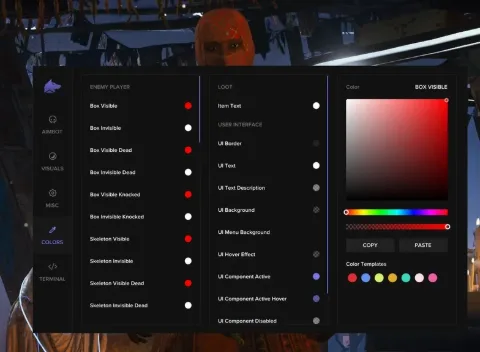
- Visible Color / Hidden Color - Separate visible/hidden colors for boxes, skeletons, names, weapons and distance.
- Visible Body / Hidden Body - Separate solid body-fill colors.
- Wounded / Corpse / Radar Colours - Colors for wounded players, remains and visible radar enemies.
- Drone / Container Colours - Individual ARC and container-type colors.
- FOV / Crosshair / Extractions - Separate aim-circle, crosshair and exit colors.
Misc8
- Increased Brightness - Increases scene brightness through exposure adjustment.
- Brightness - Strength from 0.00 to 1.00.
- Flashlight Override - Changes flashlight parameters.
- Flashlight Brightness - Adjustment from 100 to 500000.
- Flashlight Color - Configurable flashlight color.
- Auto Fire - Repeated left clicks while the assigned key is held; does not detect a target under the crosshair.
- Auto Fire Key - Configurable auto-fire key.
- Function Markers - Brightness, flashlight and auto-fire options have red menu markers.
Config7
- Config Name - Name for a new or overwritten configuration.
- Configuration List - Selects a saved profile and copies its name to Config Name.
- Save - Saves current settings to JSON; creates a new profile or overwrites an existing name.
- Load - Applies the selected profile.
- Refresh - Refreshes the configuration-file list.
- Delete - Deletes the selected settings file.
- Autosave - Saves changed current settings to the default profile; named profiles are managed separately.
Description
Vengeance for ARC Raiders combines Memory Aimbot, player ESP, loot filtering and a radar map with independent object layers. Buy a 1-day, 3-day, 7-day or 30-day key on Playmate Market and review the screenshots and feature list before choosing your access period.
Aim settings include smoothing, FOV, body-point selection, visibility checks, movement prediction and two activation keys. Player ESP displays skeletons, names, weapons, distance, health and armor, with separate colors for visible and hidden body areas.
Loot filters help narrow items by value, rarity, category or an individual whitelist. World ESP covers containers, extraction points and 20 ARC machine types. Dedicated HUD panels show nearby players, exits and valuable loot.
The radar supports map backgrounds, floors, zoom and waypoints. Player, item, drone and container layers have independent range controls. Battle Mode hides distracting markers with a key press, while saved configuration profiles preserve your settings. The interface supports English and Russian.
System requirements
- Supported game client
- Steam
- Built-in spoofer
- No
- Anticheat
- In-game
- OBS capture bypass
- No
- Supported display modes
- Windowed, Borderless
- Supported processors
- Intel & AMD
- Supported operating systems
- Windows 10, Windows 11 (x64)
Support
- Launch instructions come with the key.
- Before the first launch go through PC preparation — most errors will not appear.
- Answers to common questions are on the FAQ page.
- If something does not work, write to the FunPay order chat or support with a screenshot of the error and your Windows version.