Neirodrop
Neirodrop for Escape from Tarkov — KD dropper bot with automatic raids and endurance leveling. Available on Playmate Market
This term is delivered manually: the key will arrive in the FunPay order chat within 2 h after payment.
Manual delivery: this product is paid directly, not via FunPay. We send the key by hand after payment.
- Direct payment, not via FunPay
- We send the key by hand after payment
- Launch instructions come with the key
Functions Neirodrop
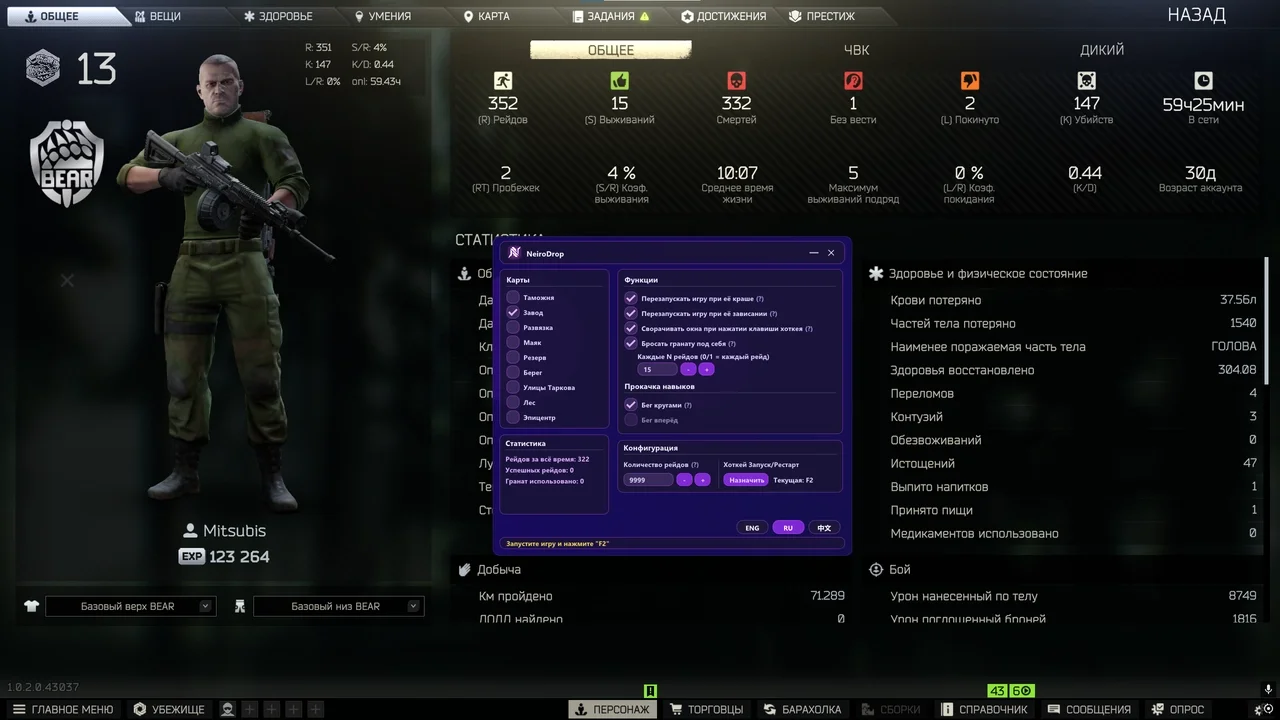
Automatic Raids3
- Automatic raid launching
- Map selection for raids
- Option to select all maps for random raid selection
Automated Actions3
- Automatically takes a grenade from stash
- Uses the grenade during raid
- Continues operation after raid completion
Settings2
- Adjustable number of raids between grenade usage
- Flexible bot configuration
Skill Leveling2
- Running mode for endurance leveling
- Automatic leveling without player interaction
Statistics2
- Raid statistics per session
- Display of grenades used during the session
Description
Buy Neirodrop for Escape from Tarkov at low price on Playmate Market. This is a KD dropper bot designed to automatically launch raids and quickly reduce player statistics.
The software automatically starts raids on selected maps. You can choose a specific map or select all maps for random raid selection.
During the raid the bot automatically takes a grenade from your stash, uses it and ends the raid, then immediately starts the next one. The process works fully automatically without user interaction.
Flexible settings allow configuring the number of raids between grenade usage. A running mode is also available for automatic endurance leveling.
Built-in statistics allow tracking the number of raids completed and grenades used during the current session. Neirodrop for Escape from Tarkov is available on Playmate Market.
System requirements
- Supported game modes
- All
- Supported CPU
- Intel & AMD
- Supported OC
- Windows 10 , Windows 11
Support
- Launch instructions come with the key.
- Before the first launch go through PC preparation — most errors will not appear.
- Answers to common questions are on the FAQ page.
- If something does not work, write to the FunPay order chat or support with a screenshot of the error and your Windows version.