Majestic Trade Bot
Buy Trade Bot for Majestic RP at a low price - the bot automatically tracks profitable listings, purchases items faster than competitors and helps automate market trading. Supports auto selling, vehicle and clothing buying, flexible profile settings and stable performance without viruses on Playmate Market
Tick the box to go to payment
This term is delivered manually: the key will arrive in the FunPay order chat within 2 h after payment.
This product cannot be bought right now: the developer is updating it after a game update. It usually takes from a few hours to a couple of days.
- Your key arrives right after payment
- Payment via FunPay — your money is protected by the marketplace
- Launch instructions come with the key
- Your key is issued right after payment
- No fee when paying by SBP or SberPay
- Launch instructions come with the key
Functions Majestic Trade Bot
Features10
- Instant Lot Reaction
- ~50ms Offer Detection
- Balance Statistics
- Cash Balance
- Bank Balance
- Purchase Statistics
- Spent Statistics
- Purchase Table
- Deal Delay
- Confirmation Status
Auto Sell6
- Automatic Item Selling
- Price Settings
- Duration Settings
- Minimum Stock
- Listing Tracking
- Cancel Listings
Profiles6
- Item Categories
- Item Lists
- Price Limits
- Session Limits
- Clothing Rules
- Vehicle Rules
Vehicle Buying6
- Vehicle Search
- Vehicle Purchase
- Brand Filter
- Price Filter
- Purchase Limits
- Server Confirmation Detection
Clothing Buying2
- Exact Parameter Match
- Similar Model Filter
Stability4
- Connection Watchdog
- Recovery After Death
- Recovery After Respawn
- Auto Recovery After Game Restart
Interface8
- Status Panel
- Game Status
- Launch Status
- Connection Status
- Authorization Status
- Market Status
- Log Window
- Event Tracking
Misc4
- Resolution Independent
- Theme Independent
- Scale Independent
- No Screen Analysis
Description
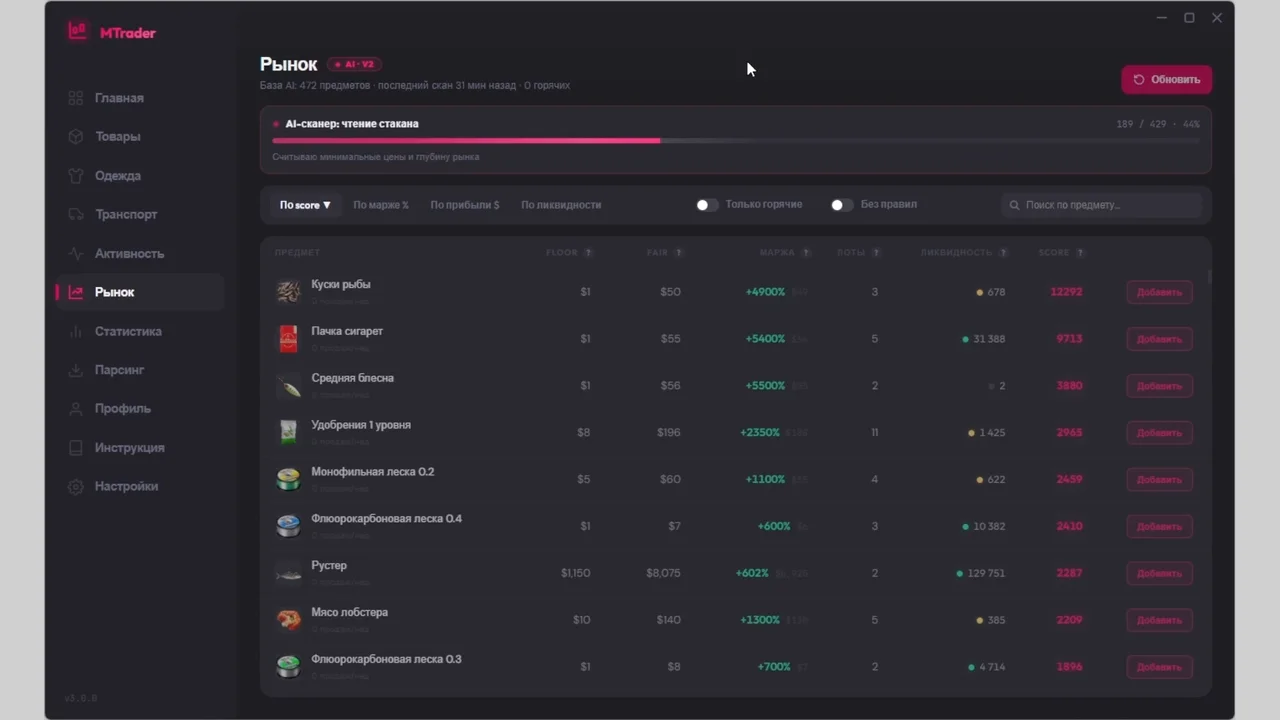
Trade Bot for Majestic RP is an automated trading bot designed for market management and faster item trading on the server. It helps players detect profitable listings, automate purchases and sales, and simplify the entire earning process.
The main advantage of the bot is its extremely fast reaction speed. The system processes new listings in around 50ms, allowing you to buy valuable items before other players. This is especially useful for rare items, vehicles and clothing.
Built-in statistics provide detailed tracking of cash balance, bank balance, purchases and expenses during the current session. A transaction table is also included with purchase delays and confirmation status for every deal.
The bot supports automatic item selling based on your custom rules. You can configure prices, listing duration and minimum stock limits. It also tracks your active listings and supports quick cancellation when needed.
A flexible profile system allows you to configure item categories, custom item lists, pricing limits and session restrictions. Separate rules are available for vehicles and clothing.
The vehicle buying system automatically searches for and purchases cars based on brand, price and limits. Clothing buying supports precise parameter matching to avoid false purchases.
Trade Bot includes a built-in watchdog system that restores connection after death, respawn or game restart, helping maintain stable operation.
The interface features a status panel with connection, authorization and market monitoring, as well as a separate log window for real-time event tracking.
The bot does not depend on screen resolution, interface theme or Windows scaling because it does not use screen analysis. Trade Bot is regularly updated and designed for stable performance on Majestic RP. You can purchase it on Playmate Market
System requirements
- Supported servers
- Majestic RP
- Stream Bypass
- Yes
- Supported game modes
- Windowed, Borderless
- Supported CPU
- Intel & AMD
- Supported OC
- Windows 10, Windows 11
Support
- Launch instructions come with the key.
- Before the first launch go through PC preparation — most errors will not appear.
- Answers to common questions are on the FAQ page.
- If something does not work, write to the FunPay order chat or support with a screenshot of the error and your Windows version.